Self-hosted GRC

Governance, risk and compliance on your servers, under your name.

TraxrGRC brings risk, compliance, controls, policies, vendors, audits and privacy into one platform for security, compliance and privacy teams in regulated organizations. Each organization runs its own instance, branded as its own.

Deployment
One instance per organization
Crosswalk hub
NIST SP 800-53 Rev 5 built in
Branding
Your name, logo and color
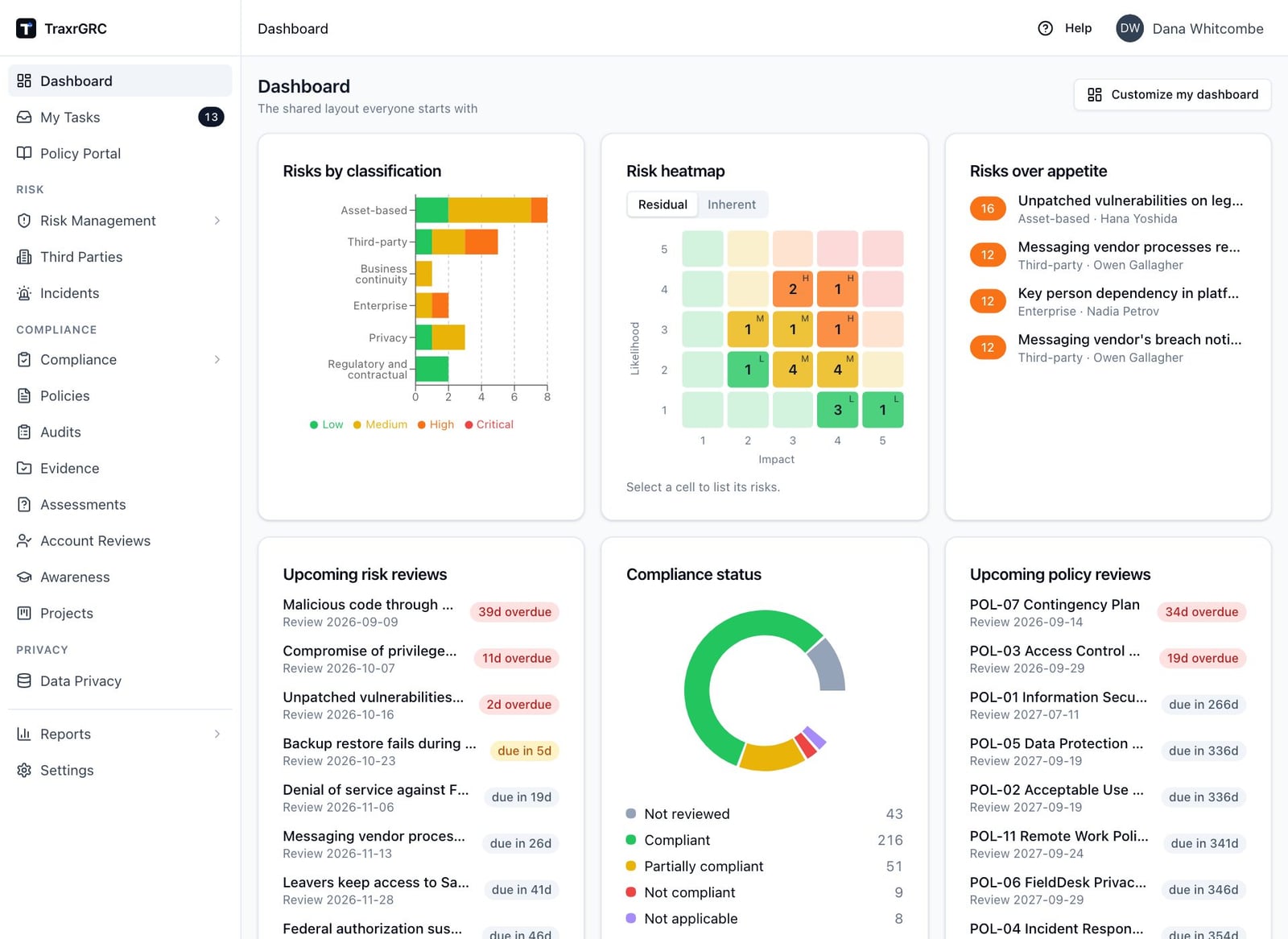
The TraxrGRC dashboard for a fictional company, showing risks by classification, a residual risk heatmap, risks over appetite, upcoming risk and policy reviews, and a compliance status donut.

GRC programs outgrow spreadsheets and rented portals.

Most teams know where their program stands only as of the last time someone updated the tracker. The work is spread across tools, and the evidence rarely keeps up with the claims.

  • Status drifts from evidence

    A requirement gets marked compliant once, and nothing tells you when the control behind it fails its next test.

  • Every framework becomes its own project

    NIST, ISO 27001, SOC 2 and GDPR share most of their controls, yet each one ends up with its own spreadsheet and its own owners.

  • Sensitive records on someone else's platform

    Risk registers, incident histories and privacy records are among the most sensitive data you hold. Many teams would rather keep them on infrastructure they control.

One platform for the whole program.

Every module runs on the same permission model, audit log and dashboard, and every data table exports to CSV.

Risk and controls

  • Risk management

    Configurable 5×5 matrix and appetite bands, inherent and residual scoring, treatments, scheduled reviews, exceptions and over-appetite warnings.

  • Internal controls

    Control catalog with recurring tests, pass and fail results kept as evidence, and a calculated status: failed, overdue, OK or untested.

  • Incident management

    Incidents linked to assets and third parties, with personal data breach assessment and the 72-hour authority notification clock.

Compliance and audit

  • Compliance management

    Framework packages with per-requirement analysis, mapping to controls, policies and risks, exceptions, gap view, POA&M and PDF reports.

  • Policy management

    Versioned policies with submit, approve and publish workflow, a policy portal for staff, and per-user acknowledgement with reminders.

  • Internal audits

    Audit plans and findings with deadlines and control mapping, and one-click remediation projects from a finding.

Third parties and privacy

  • Third-party management

    Vendor, partner and customer registers with contacts, lifecycle status, linked risks and data protection details.

  • Online assessments

    Questionnaires sent to vendor contacts through a tokenized link, with evidence uploads, scoring, one rework round and scheduled repeats.

  • Data privacy

    Records of processing, the Article 30 register, DPIAs with DPO sign-off, transfers, a data map and data mapping questionnaires.

People and reporting

  • Security awareness

    Training programs with a built-in test editor, server-side grading, completion tracking and reminder emails.

  • Account reviews

    Review programs for user accounts across systems, with CSV import and bulk keep or disable decisions attributed to the reviewer.

  • Reports and dashboard

    Seven cross-module reports with CSV downloads, and a widget dashboard that each person can customize.

Built for teams that answer to auditors, regulators and their own board.

01

Your servers, your brand

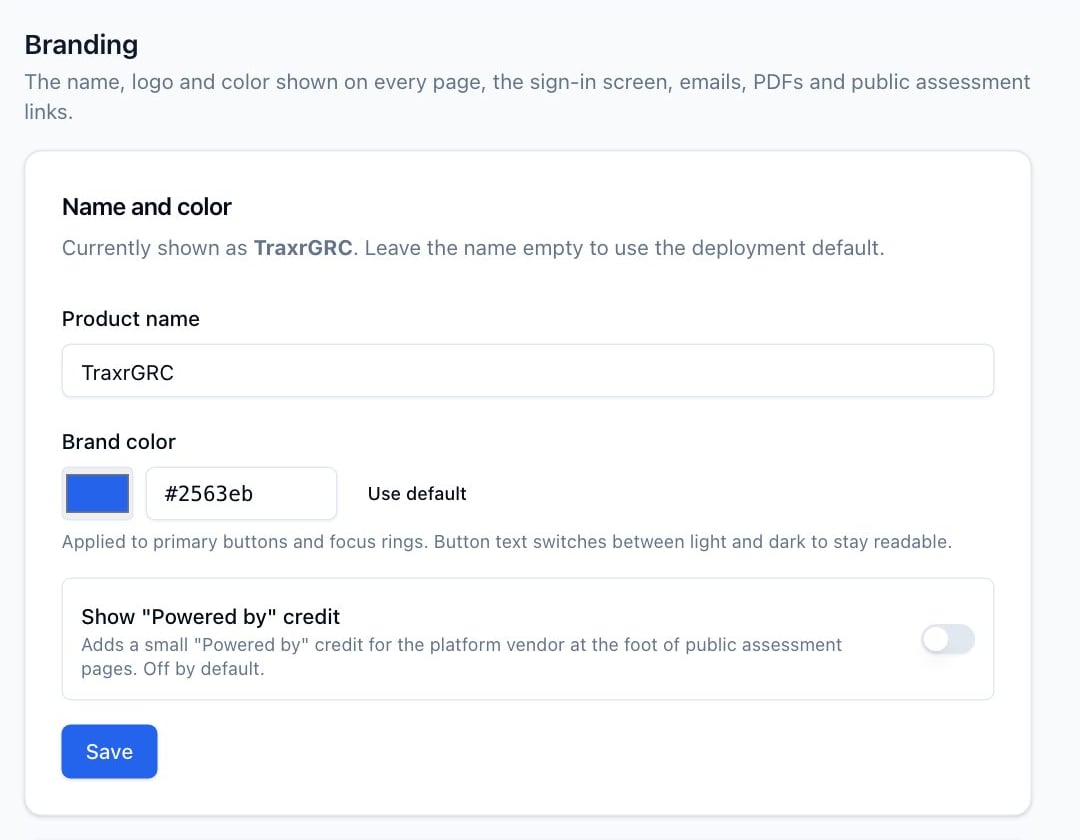
Set the product name, logo and brand color once. Every page title, email, PDF, the sign-in screen and the public assessment pages your vendors see carry your name.

  • A separate instance for each organization, with its own application, database and files
  • The optional "Powered by" credit is off by default
  • No other page names the platform vendor
The Branding settings page with fields for product name and brand color, and a Powered by credit switch that is off.
02

Map once, report against many frameworks

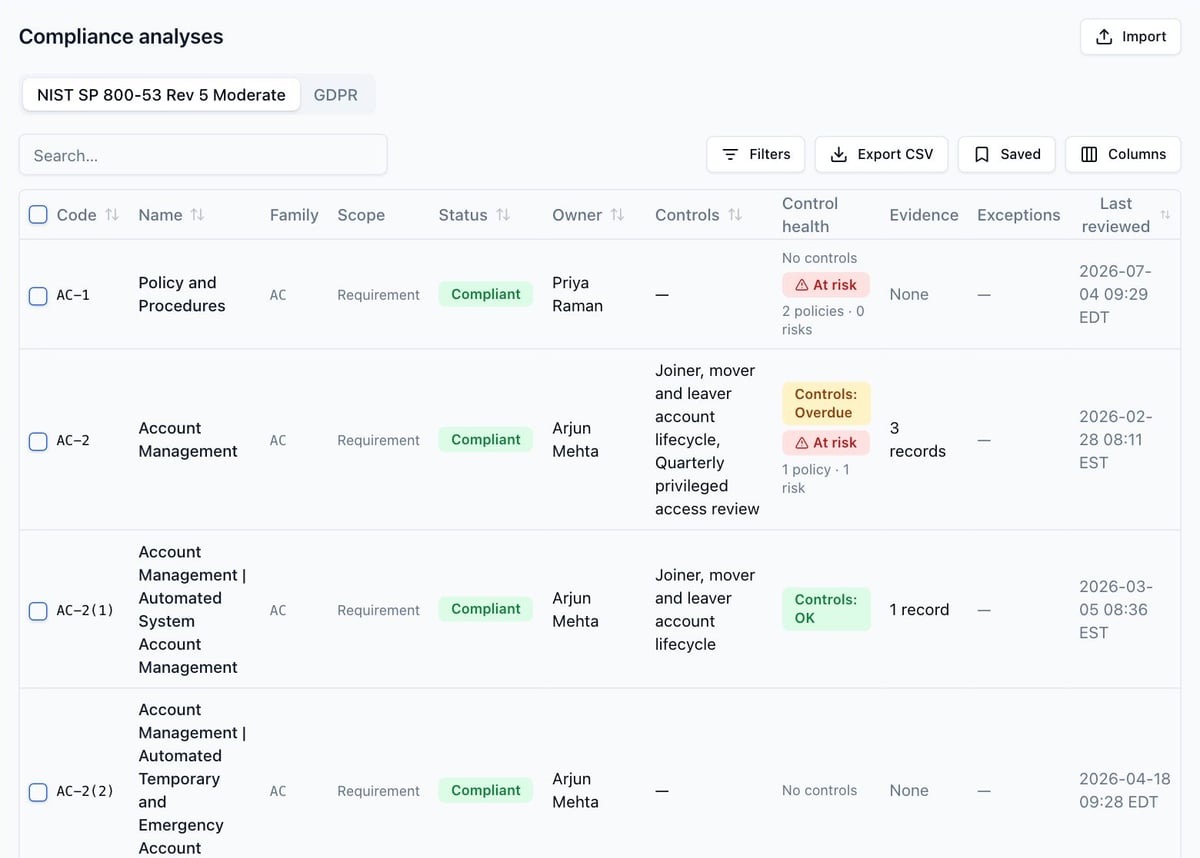
Each requirement maps many-to-many to the controls, policies and risks that support it. NIST SP 800-53 Rev 5 ships with the platform as the hub other frameworks connect to.

  • The full 800-53 Rev 5 catalog with Low, Moderate, High and Privacy baselines
  • Built-in crosswalk from 800-53 to ISO/IEC 27001:2022, plus CSV import for others
  • Crosswalk links indicate status and leave the decision to a person
  • System packages inherit common controls from a corporate package
The compliance analyses workspace on the NIST SP 800-53 Rev 5 Moderate package, listing requirements with status, owner, mapped controls, control health badges such as At risk and Controls overdue, and evidence counts.
03

Control tests that reach risk and compliance

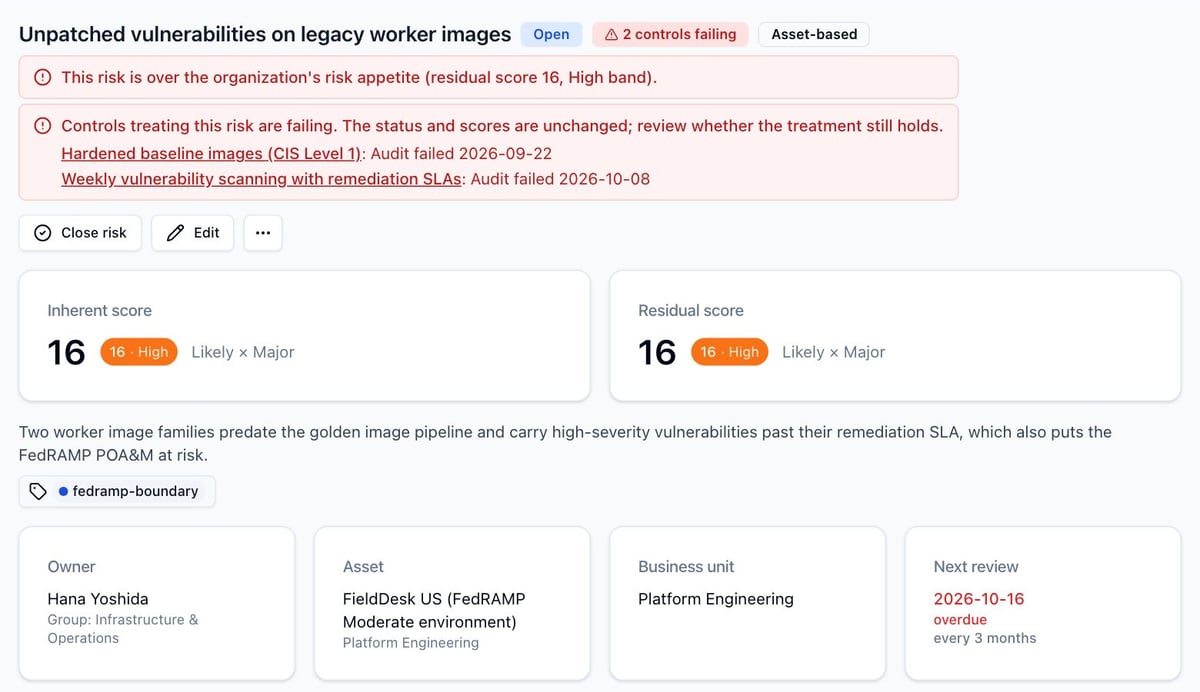
Controls are tested on a schedule, and every result is kept as evidence. When a test fails, the platform tells the people who need to know where they already work.

  • The control owner gets an email, and a finding can be raised automatically
  • Every risk the control treats shows "controls failing"
  • Compliance claims the evidence no longer supports are flagged "at risk"
A risk detail page warning that the risk is over appetite and that two controls treating it failed their most recent audits, with links to each control.
04

Privacy in the same place as security

Privacy teams work from the same platform, with the records and deadlines GDPR asks for.

  • Records of processing and an Article 30 register export
  • DPIAs with WP248 screening, a frozen review state and DPO sign-off
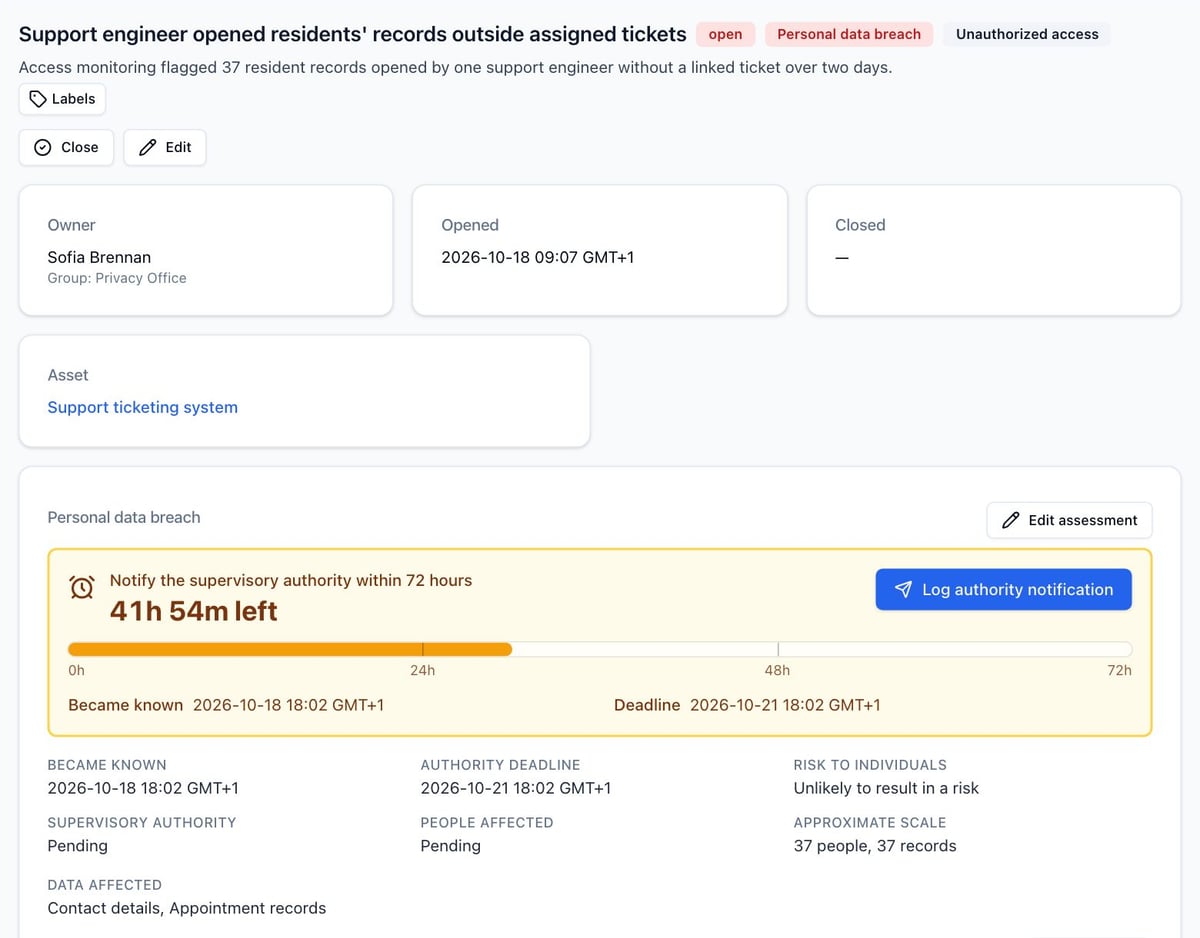
  • Personal data breach assessment with the 72-hour authority clock and a notification log
  • Transfers, transfer impact assessments and data mapping questionnaires
An incident marked as a personal data breach, with a deadline banner showing 41 hours 53 minutes left to notify the supervisory authority, a bar across the 72 hours marked at 24 and 48 hours, a Log authority notification button, and the assessment details below.
05

An audit log you can prove

Every change is recorded with who made it, what changed and when, and each record has its own history tab.

  • Append-only for the application: database triggers refuse edits and deletes
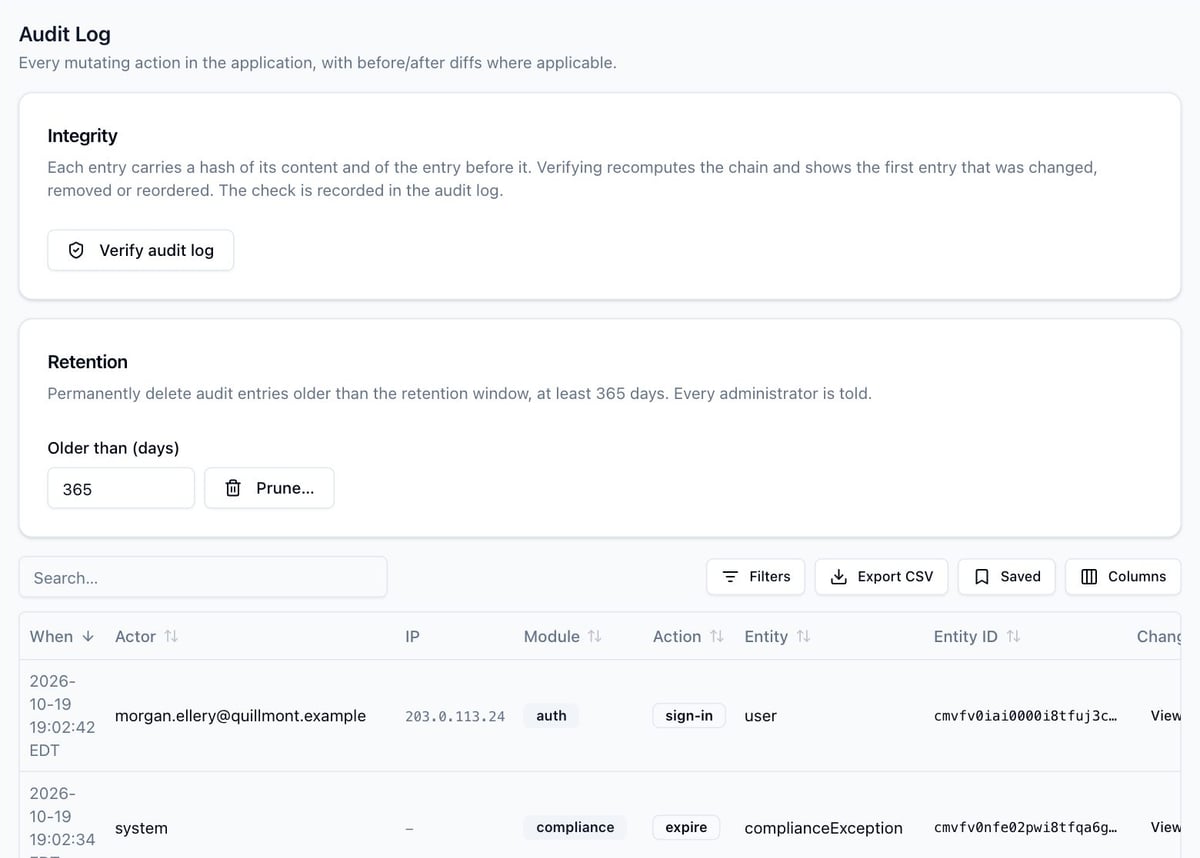
  • Each entry is hashed with the one before it, so a change anywhere breaks the chain
  • Verify the chain from the Audit Log page or on a schedule from the server
The Audit Log page with an Integrity card and a Verify audit log button, a Retention card with a 365-day minimum, and a table of entries with actor, IP address, module and action.
06

AI assistants with real permissions

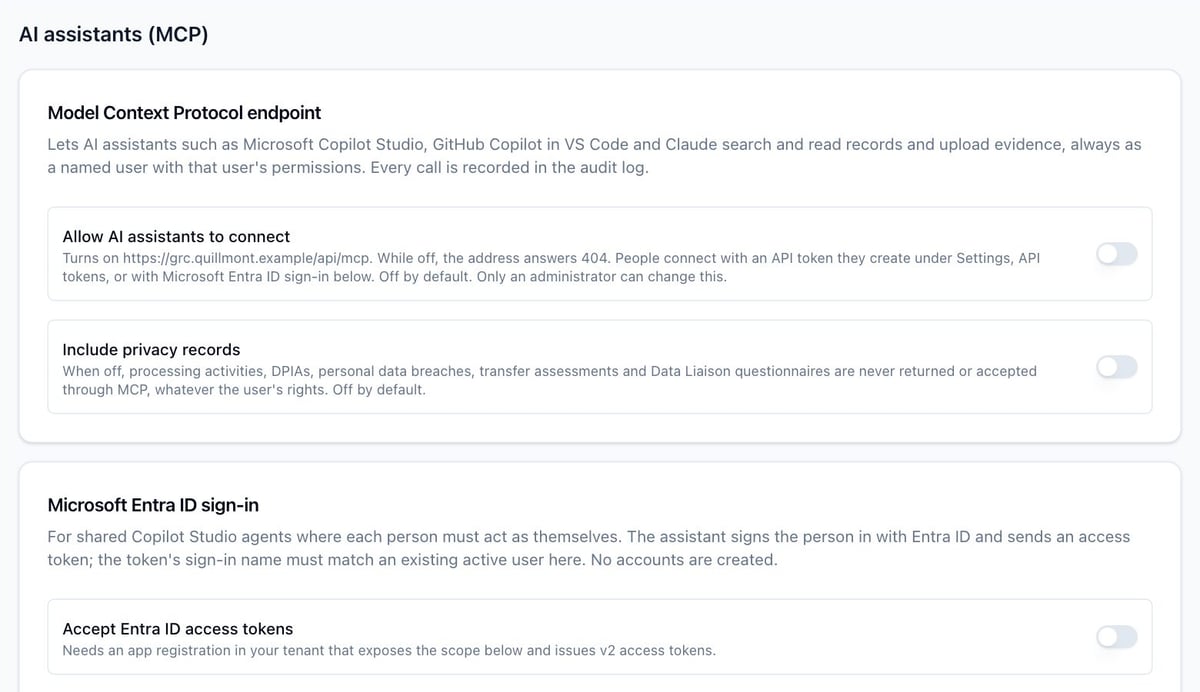
A built-in Model Context Protocol server lets assistants such as Microsoft Copilot Studio agents, GitHub Copilot in VS Code and Claude Code search records and attach evidence.

  • Every call acts as a named user, with that user's live permissions
  • Off by default, with privacy records excluded unless an administrator includes them
  • No tool deletes, edits record fields or makes decisions
  • Every call is written to the audit log
The AI assistants settings page with switches to allow assistants to connect and to include privacy records, both off, and Microsoft Entra ID sign-in fields.

Runs where you decide, with nothing shared.

Each organization gets its own instance on a Linux server with Docker: its own application, background worker, PostgreSQL database and files.

  1. 01

    Install

    Fill in one configuration file and start the stack with Docker Compose, using the bundled HTTPS proxy or your own.

  2. 02

    Connect

    Set your branding, SMTP and sign-in: local accounts, LDAP, SAML 2.0, and SCIM 2.0 provisioning from Microsoft Entra ID.

  3. 03

    Load

    Start from the NIST 800-53 catalog, import the frameworks you are licensed to use, and bring in registers by CSV.

Server
2 vCPU, 4 GB RAM and 20 GB of disk are enough for most organizations
Outbound calls
Telemetry and update checks are off; it connects only to services you configure
Backups
Signed in-app snapshots, a weekly scheduled snapshot, and full database dumps from the server
Integration
REST API with an OpenAPI 3.1 spec and per-module token scopes

A GRC tool should meet the standard it measures.

These protections are built into the product and on by default unless noted.

  • Granular access control

    Groups and roles with per-module permissions, each scoped to all records or only your own. The UI, server and API enforce the same rules.

  • Sign-in hardening

    Built-in two-step verification, optional or required for everyone, plus throttling of repeated failed sign-ins and alerts to administrators.

  • Single sign-on and provisioning

    SAML 2.0 with signed, single-use assertions; LDAP over TLS; SCIM 2.0 for Microsoft Entra ID; an SSO-only mode with break-glass administrators.

  • Secrets protected at rest

    Integration secrets are encrypted with AES-256-GCM and write-only in the UI. API and SCIM tokens are stored only as hashes.

  • Hardened by default

    Nonce-based Content Security Policy, HSTS and framing protection. Containers run as non-root with a read-only filesystem.

  • Separation of duties

    By default, requesters cannot approve their own policy changes or exceptions. A second-person DPIA sign-off can also be required.

You operate the server, so network, operating system and backup storage controls stay with your team. The administrator's guide includes a hardening checklist.

Questions teams ask first.

Where does our data live?

On the server you install it on. Each organization has its own instance and database, and nothing is shared between instances. The application makes no telemetry or update calls; it connects only to the services you configure, such as SMTP, LDAP and Microsoft Entra ID.

Which frameworks are included?

The NIST SP 800-53 Rev 5 catalog ships with the platform, including the Low, Moderate, High and Privacy baselines, along with a crosswalk from 800-53 to ISO/IEC 27001:2022. Frameworks whose text is licensed by their publishers, such as ISO 27001, SOC 2, NIST CSF and PCI DSS, are not bundled. Import the ones you are licensed to use from CSV or JSON.

Can we put our own name on it?

Yes. Settings › Branding sets the product name, logo and brand color, and the whole application follows it, including emails, PDFs, the sign-in screen and the assessment pages vendors open. The small "Powered by" credit on public assessment pages is off by default.

Does it work with our identity provider?

It supports local accounts with two-step verification, LDAP, and SAML 2.0 single sign-on. SCIM 2.0 provisioning for Microsoft Entra ID creates, updates and deactivates accounts from the directory, while roles stay managed in the application.

Can an AI assistant change our records?

Assistants can search, read and attach evidence, and only where the connected user has that right. No tool deletes records, edits their fields or decides an approval. The connection is off until an administrator turns it on, privacy records are excluded by default, and every call is audited.

How do we get our existing data in?

Risks, controls, assets, policies, third parties, incidents, projects and audit findings import from CSV. Every row is checked against the same rules as the forms first, and the rows are applied together, so a bad file changes nothing. Compliance packages import from CSV or JSON, every data table exports to CSV, and a REST API covers the rest.

Can we see it before we commit?

Yes. Request a demo and we will walk you through the platform on a demo instance loaded with a fictional company's data.
See TraxrGRC with your program in mind.

Tell us which frameworks you work against and how your team is set up. We will show you how they fit, from risk register to breach clock.

Sent through Formspree. See Privacy.